












Lagu Tema Super Mario dengan Piezo Buzzer dan Arduino!

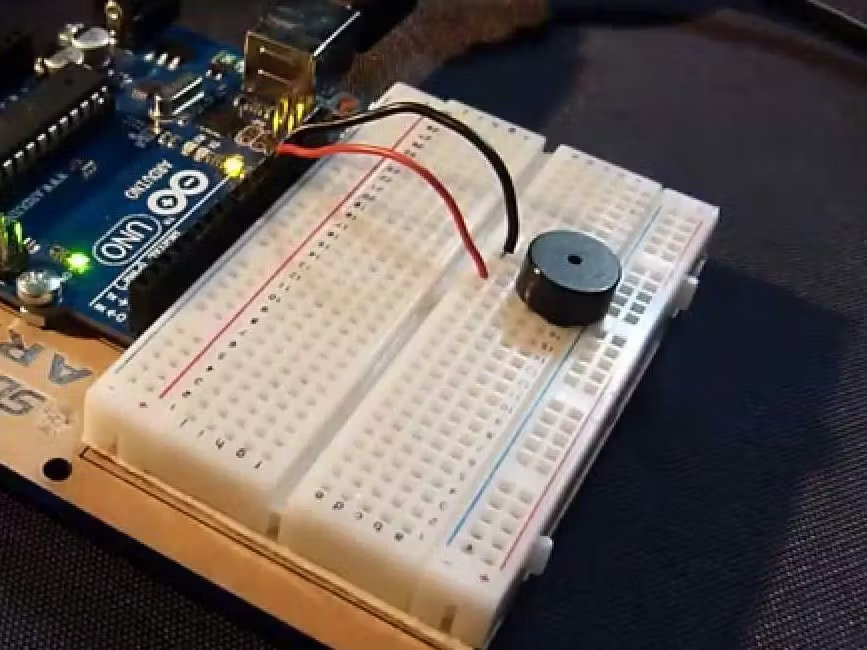
Ini adalah sebuah posting lengkap tentang cara memainkan lagu tema Super Mario Bros menggunakan sebuah buzzer. Proyek ini sangat sederhana, menyenangkan, dan cocok sebagai proyek Arduino untuk pemula.
Perangkat yang digunakan dalam proyek ini
Komponen hardware
- DFRobot Arduino Uno Rev 3 × 1
- DFRobot Breadboard Jumper Cables High Quality (30 Pack) × 1
- DFRobot Breadboard Jumper Cables High Quality (30 Pack) × 1
- SparkFun Mini Speaker – PC Mount 12mm 2.048 kHz × 1
- Breadboard (generic) × 1
Aplikasi perangkat lunak dan layanan online
Arduino IDE
Langkah-langkah
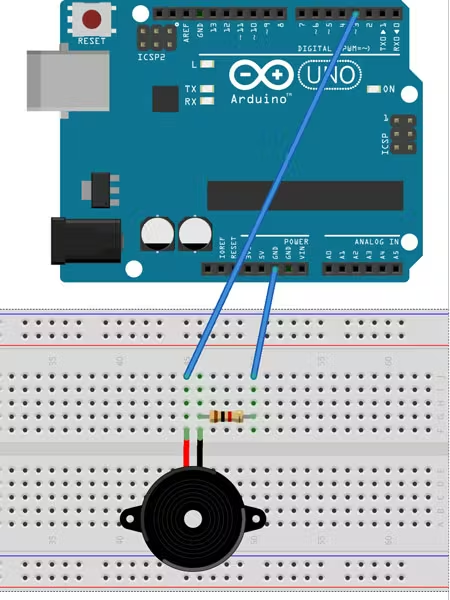
- Hubungkan sisi positif buzzer ke pin digital 3.
- Kemudian hubungkan sisi negatifnya ke sebuah resistor 1 k ohm.
- Hubungkan sisi lain dari resistor 1 k ohm tersebut ke pin ground (GND) pada Arduino. Ingat untuk menghubungkan buzzer dengan arah yang benar, karena buzzer memiliki pin positif dan negatif.
Jadi pada dasarnya, buzzer, resistor 1 k ohm, dan Arduino harus dihubungkan seperti berikut:
pin digital 3 Arduino → buzzer → resistor 1 k ohm → pin ground (GND) Arduino.
Sebenarnya, kamu bisa saja tidak menggunakan resistor 1 k ohm. Jika kamu menghubungkannya tanpa resistor, buzzer akan berbunyi jauh lebih keras, namun kualitas suaranya bisa menurun. Kamu juga bisa menurunkan nilai resistansi untuk mendapatkan suara yang sedikit lebih keras sambil tetap menjaga kualitas suara. Ide lainnya adalah menggunakan potensiometer sebagai pengganti resistor untuk berfungsi sebagai pengatur volume. Untuk tutorial ini, kita hanya akan menggunakan resistor 1 k ohm.
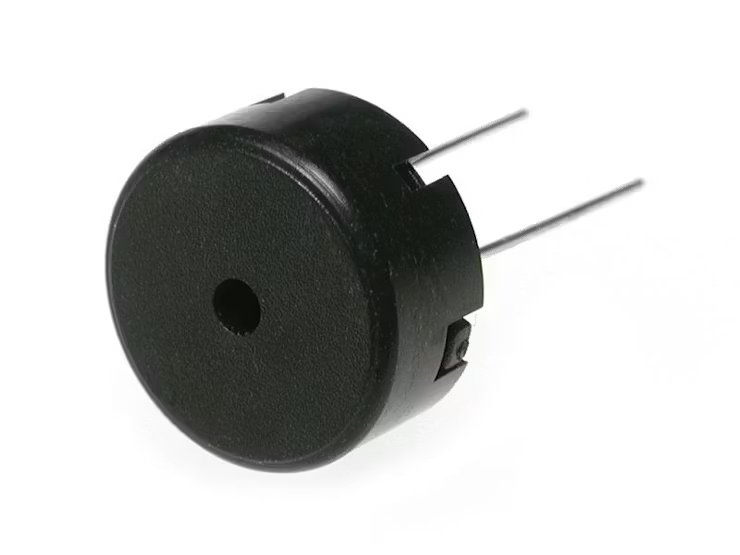
Piezo Buzzer
Buzzer atau beeper adalah perangkat pemberi sinyal audio, yang dapat bersifat mekanis, elektromekanis, atau piezoelektrik. Penggunaan umum buzzer dan beeper meliputi perangkat alarm, timer, serta konfirmasi input pengguna seperti klik mouse atau penekanan tombol.
Skema
Kode
/* Arduino Mario Bros Tunes With Piezo Buzzer and PWM

             by : ARDUTECH
  Connect the positive side of the Buzzer to pin 3,
  then the negative side to a 1k ohm resistor. Connect
  the other side of the 1 k ohm resistor to
  ground(GND) pin on the Arduino.
  */


#define NOTE_B0  31
#define NOTE_C1  33
#define NOTE_CS1 35
#define NOTE_D1  37
#define NOTE_DS1 39
#define NOTE_E1  41
#define NOTE_F1  44
#define NOTE_FS1 46
#define NOTE_G1  49
#define NOTE_GS1 52
#define NOTE_A1  55
#define NOTE_AS1 58
#define NOTE_B1  62
#define NOTE_C2  65
#define NOTE_CS2 69
#define NOTE_D2  73
#define NOTE_DS2 78
#define NOTE_E2  82
#define NOTE_F2  87
#define NOTE_FS2 93
#define NOTE_G2  98
#define NOTE_GS2 104
#define NOTE_A2  110
#define NOTE_AS2 117
#define NOTE_B2  123
#define NOTE_C3  131
#define NOTE_CS3 139
#define NOTE_D3  147
#define NOTE_DS3 156
#define NOTE_E3  165
#define NOTE_F3  175
#define NOTE_FS3 185
#define NOTE_G3  196
#define NOTE_GS3 208
#define NOTE_A3  220
#define NOTE_AS3 233
#define NOTE_B3  247
#define NOTE_C4  262
#define NOTE_CS4 277
#define NOTE_D4  294
#define NOTE_DS4 311
#define NOTE_E4  330
#define NOTE_F4  349
#define NOTE_FS4 370
#define NOTE_G4  392
#define NOTE_GS4 415
#define NOTE_A4  440
#define NOTE_AS4 466
#define NOTE_B4  494
#define NOTE_C5  523
#define NOTE_CS5 554
#define NOTE_D5  587
#define NOTE_DS5 622
#define NOTE_E5  659
#define NOTE_F5  698
#define NOTE_FS5 740
#define NOTE_G5  784
#define NOTE_GS5 831
#define NOTE_A5  880
#define NOTE_AS5 932
#define NOTE_B5  988
#define NOTE_C6  1047
#define NOTE_CS6 1109
#define NOTE_D6  1175
#define NOTE_DS6 1245
#define NOTE_E6  1319
#define NOTE_F6  1397
#define NOTE_FS6 1480
#define NOTE_G6  1568
#define NOTE_GS6 1661
#define NOTE_A6  1760
#define NOTE_AS6 1865
#define NOTE_B6  1976
#define NOTE_C7  2093
#define NOTE_CS7 2217
#define NOTE_D7  2349
#define NOTE_DS7 2489
#define NOTE_E7  2637
#define NOTE_F7  2794
#define NOTE_FS7 2960
#define NOTE_G7  3136
#define NOTE_GS7 3322
#define NOTE_A7  3520
#define NOTE_AS7 3729
#define NOTE_B7  3951
#define NOTE_C8  4186
#define NOTE_CS8 4435
#define NOTE_D8  4699
#define NOTE_DS8 4978

#define melodyPin 3
//Mario main theme melody
int melody[] = {
  NOTE_E7, NOTE_E7, 0, NOTE_E7,
  0, NOTE_C7, NOTE_E7, 0,
  NOTE_G7, 0, 0,  0,
  NOTE_G6, 0, 0, 0,

  NOTE_C7, 0, 0, NOTE_G6,
  0, 0, NOTE_E6, 0,
  0, NOTE_A6, 0, NOTE_B6,
  0, NOTE_AS6, NOTE_A6, 0,

  NOTE_G6, NOTE_E7, NOTE_G7,
  NOTE_A7, 0, NOTE_F7, NOTE_G7,
  0, NOTE_E7, 0, NOTE_C7,
  NOTE_D7, NOTE_B6, 0, 0,

  NOTE_C7, 0, 0, NOTE_G6,
  0, 0, NOTE_E6, 0,
  0, NOTE_A6, 0, NOTE_B6,
  0, NOTE_AS6, NOTE_A6, 0,

  NOTE_G6, NOTE_E7, NOTE_G7,
  NOTE_A7, 0, NOTE_F7, NOTE_G7,
  0, NOTE_E7, 0, NOTE_C7,
  NOTE_D7, NOTE_B6, 0, 0
};
//Mario main them tempo
int tempo[] = {
  12, 12, 12, 12,
  12, 12, 12, 12,
  12, 12, 12, 12,
  12, 12, 12, 12,

  12, 12, 12, 12,
  12, 12, 12, 12,
  12, 12, 12, 12,
  12, 12, 12, 12,

  9, 9, 9,
  12, 12, 12, 12,
  12, 12, 12, 12,
  12, 12, 12, 12,

  12, 12, 12, 12,
  12, 12, 12, 12,
  12, 12, 12, 12,
  12, 12, 12, 12,

  9, 9, 9,
  12, 12, 12, 12,
  12, 12, 12, 12,
  12, 12, 12, 12,
};
//Underworld melody
int underworld_melody[] = {
  NOTE_C4, NOTE_C5, NOTE_A3, NOTE_A4,
  NOTE_AS3, NOTE_AS4, 0,
  0,
  NOTE_C4, NOTE_C5, NOTE_A3, NOTE_A4,
  NOTE_AS3, NOTE_AS4, 0,
  0,
  NOTE_F3, NOTE_F4, NOTE_D3, NOTE_D4,
  NOTE_DS3, NOTE_DS4, 0,
  0,
  NOTE_F3, NOTE_F4, NOTE_D3, NOTE_D4,
  NOTE_DS3, NOTE_DS4, 0,
  0, NOTE_DS4, NOTE_CS4, NOTE_D4,
  NOTE_CS4, NOTE_DS4,
  NOTE_DS4, NOTE_GS3,
  NOTE_G3, NOTE_CS4,
  NOTE_C4, NOTE_FS4, NOTE_F4, NOTE_E3, NOTE_AS4, NOTE_A4,
  NOTE_GS4, NOTE_DS4, NOTE_B3,
  NOTE_AS3, NOTE_A3, NOTE_GS3,
  0, 0, 0
};
//Underwolrd tempo
int underworld_tempo[] = {
  12, 12, 12, 12,
  12, 12, 6,
  3,
  12, 12, 12, 12,
  12, 12, 6,
  3,
  12, 12, 12, 12,
  12, 12, 6,
  3,
  12, 12, 12, 12,
  12, 12, 6,
  6, 18, 18, 18,
  6, 6,
  6, 6,
  6, 6,
  18, 18, 18, 18, 18, 18,
  10, 10, 10,
  10, 10, 10,
  3, 3, 3
};

void setup(void)
{
  pinMode(3, OUTPUT);//buzzer
  pinMode(13, OUTPUT);//led indicator when singing a note

}
void loop()
{
  //sing the tunes
  sing(1);
  sing(1);
  sing(2);
}
int song = 0;

void sing(int s) {
  // iterate over the notes of the melody:
  song = s;
  if (song == 2) {
    Serial.println(" 'Underworld Theme'");
    int size = sizeof(underworld_melody) / sizeof(int);
    for (int thisNote = 0; thisNote < size; thisNote++) {

      // to calculate the note duration, take one second
      // divided by the note type.
      //e.g. quarter note = 1000 / 4, eighth note = 1000/8, etc.
      int noteDuration = 1000 / underworld_tempo[thisNote];

      buzz(melodyPin, underworld_melody[thisNote], noteDuration);

      // to distinguish the notes, set a minimum time between them.
      // the note's duration + 30% seems to work well:
      int pauseBetweenNotes = noteDuration * 1.30;
      delay(pauseBetweenNotes);

      // stop the tone playing:
      buzz(melodyPin, 0, noteDuration);

    }

  } else {

    Serial.println(" 'Mario Theme'");
    int size = sizeof(melody) / sizeof(int);
    for (int thisNote = 0; thisNote < size; thisNote++) {

      // to calculate the note duration, take one second
      // divided by the note type.
      //e.g. quarter note = 1000 / 4, eighth note = 1000/8, etc.
      int noteDuration = 1000 / tempo[thisNote];

      buzz(melodyPin, melody[thisNote], noteDuration);

      // to distinguish the notes, set a minimum time between them.
      // the note's duration + 30% seems to work well:
      int pauseBetweenNotes = noteDuration * 1.30;
      delay(pauseBetweenNotes);

      // stop the tone playing:
      buzz(melodyPin, 0, noteDuration);

    }
  }
}

void buzz(int targetPin, long frequency, long length) {
  digitalWrite(13, HIGH);
  long delayValue = 1000000 / frequency / 2; // calculate the delay value between transitions
  //// 1 second's worth of microseconds, divided by the frequency, then split in half since
  //// there are two phases to each cycle
  long numCycles = frequency * length / 1000; // calculate the number of cycles for proper timing
  //// multiply frequency, which is really cycles per second, by the number of seconds to
  //// get the total number of cycles to produce
  for (long i = 0; i < numCycles; i++) { // for the calculated length of time...
    digitalWrite(targetPin, HIGH); // write the buzzer pin high to push out the diaphram
    delayMicroseconds(delayValue); // wait for the calculated delay value
    digitalWrite(targetPin, LOW); // write the buzzer pin low to pull back the diaphram
    delayMicroseconds(delayValue); // wait again or the calculated delay value
  }
  digitalWrite(13, LOW);

}
Credits
TechArea translated from hackster.io